Security and incidents · DP034
How access reviews prevent former staff from keeping customer access
Review customer-data access with a clear owner, role changes and departure checks, including shared accounts, exports and vendor support permissions.
Research cutoff: . This dated explainer is general information; check the linked instruments and your circumstances before acting.

Removing a former employee from the payroll does not necessarily remove their access to customer information. They may still have an application account, a shared password, a personal copy of a spreadsheet or access through a messaging group. An access review follows those routes instead of stopping at the main login screen.
The future Rule 6 security safeguards include appropriate measures to control access to computer resources used for processing personal data. As of 22 October 2026, that rule and the main business duties are scheduled for 13 May 2027 under the commencement notification. Reviewing access now is a practical preparation step, with any currently applicable duties assessed separately.
Start with the people who can do the most
Ask each system administrator for a current list of accounts and permissions. Begin with people who can export, delete, change permissions or see large volumes of records. Include service accounts, supplier support accounts and integration credentials, not just employees with ordinary logins.
For each account, record its owner, business purpose and approving manager. An account called “office” creates an immediate question: who uses it, and how would the business remove one person’s access without disrupting everyone else?
Where possible, use individual accounts and permissions appropriate to the work. This is a recommended control design, not a claim that the Act prescribes one universal account architecture. The aim is to make access explainable and changes executable.
Check roles against actual tasks
A hypothetical wholesaler has a sales employee who moves into purchasing. Their old role required viewing customer orders; the new role primarily involves supplier records. If permissions only accumulate, the employee retains customer access indefinitely because nobody treated the role change as a review trigger.
Ask the manager which tasks still require each permission. “They might need it someday” should prompt a specific discussion, not automatic approval. Temporary access can have an expiry and a named person responsible for reviewing any extension.
For higher-consequence functions, consider whether the same person needs to approve and execute the action. A small team may not have enough staff for perfect separation, but it can still require a second review for bulk exports or major permission changes where practical.
Treat departures as a sequence
Create an exit trigger that reaches the administrator at the right time. Human resources, the founder or the contractor’s manager must provide the event; the administrator cannot act on information they never receive.
The sequence should cover disabling accounts, ending active sessions where the system supports it, changing shared credentials where necessary, removing groups and recovering business devices. Check remote support tools and integrations created by the departing person. Reassign ownership of essential files before removing an account so the business does not lose operational access.
Copies require a separate conversation. Removing a login does not retrieve a file already downloaded to an unmanaged device. Use contractual, device-management and operational measures suited to the arrangement, and record unresolved limitations rather than declaring the information recovered without evidence.
Include the people outside payroll
A marketing agency, freelance developer or software support team can have access long after a project finishes. Give each outside relationship an internal sponsor who knows when the work ends.
Under the future section 8 obligations, the Data Fiduciary remains accountable for processing on its behalf, and processor arrangements require appropriate attention. A vendor’s statement that it is trusted is not a current list of which people or systems can access the data.
Ask whether supplier access is permanent, requested for a particular task or restricted by time. Check the contract and the configuration together. A promise of limited access should correspond to how the service actually operates.
Record decisions and verify changes
The output of a review should be a short decision list: retain, reduce, remove or investigate. Give each change an owner and a completion date. After execution, verify the resulting permissions rather than treating a submitted ticket as the finished control.
A useful review record explains why retained access is needed and identifies exceptions. It should not contain unnecessary copies of customer records. Review on meaningful events, such as departures and role changes, as well as at a frequency appropriate to the business.
If an unexpected account has accessed personal data, investigate what happened and whether an incident process is needed. An access review is both preventive and diagnostic. Closing the account is a useful first action, but it does not answer what the account did before removal.
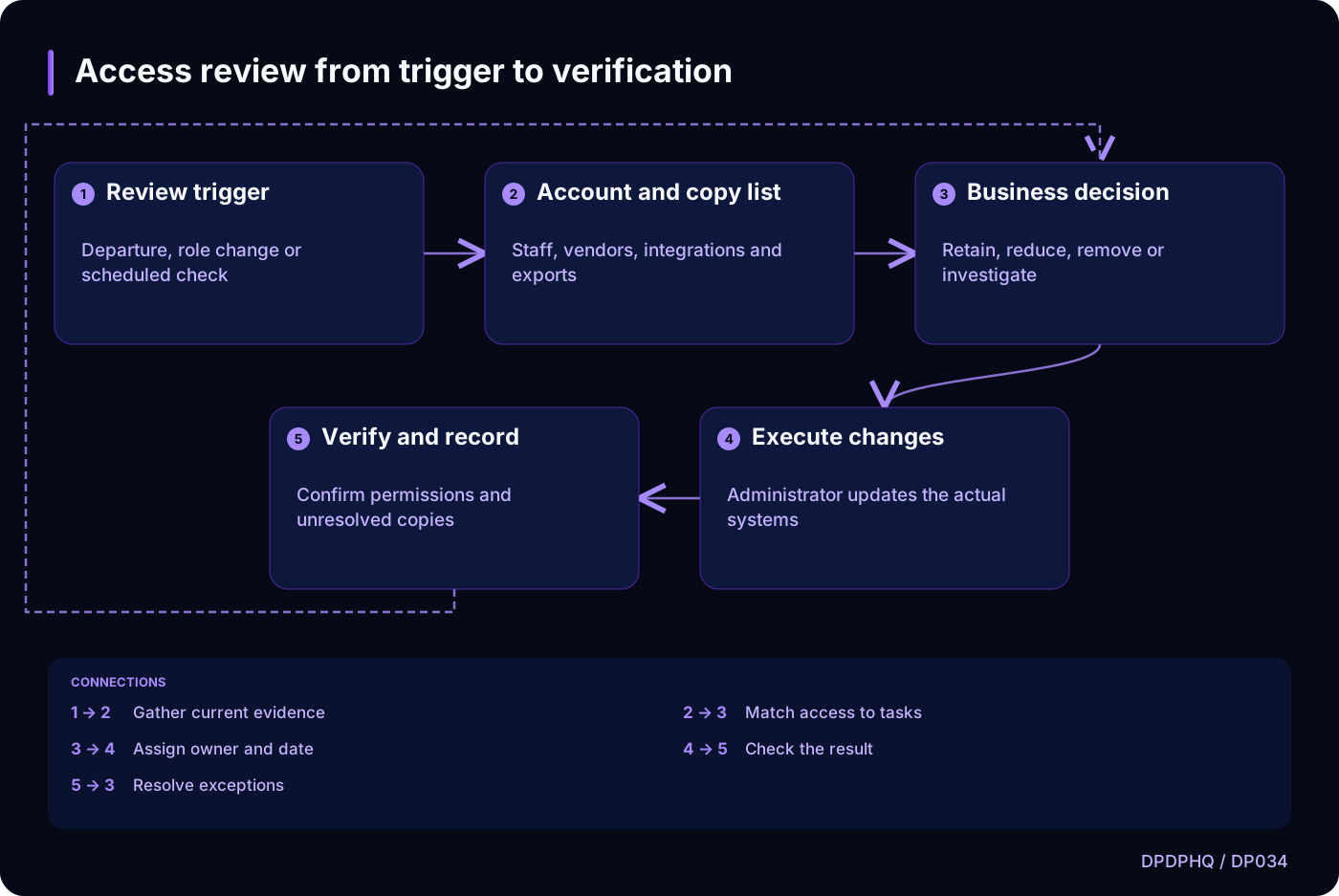
Access review from trigger to verification
Text version of the diagram
- Review trigger: Departure, role change or scheduled check
- Account and copy list: Staff, vendors, integrations and exports
- Business decision: Retain, reduce, remove or investigate
- Execute changes: Administrator updates the actual systems
- Verify and record: Confirm permissions and unresolved copies
- Review trigger → Account and copy list: Gather current evidence
- Account and copy list → Business decision: Match access to tasks
- Business decision → Execute changes: Assign owner and date
- Execute changes → Verify and record: Check the result
- Verify and record → Business decision: Resolve exceptions
Sources and reading context
These references support the original 22 October 2026 research. Source links and the date above make the scope of this article explicit.
- Digital Personal Data Protection Rules, 2025 · Rule 6(1)(b)
Access control safeguard
- Commencement notification for provisions of the DPDP Act · Paragraph (c)
Relevant future phase
- Digital Personal Data Protection Act, 2023 · Section 8(1), (2) and (5)
Accountability, processor engagement and security